

Export Stability Study Test Results
Last updated: Apr 17, 2026
Who can complete this task?
Veeva LIMS Basics: Stability Design & Study Admin, LIMS Approver
You can export the results of a stability study to CSV or Excel. This is useful when the data is required for reporting outside of LIMS or for ingestion into another system.
You can export the results only for Initiated studies in the following lifecycle states:
- In Progress
- In Revision
- In Review
- Timepoints Complete
- Completed
To export stability study results:
Open the study record and select Export Results to Excel or Export Results to CSV from the All Actions menu.
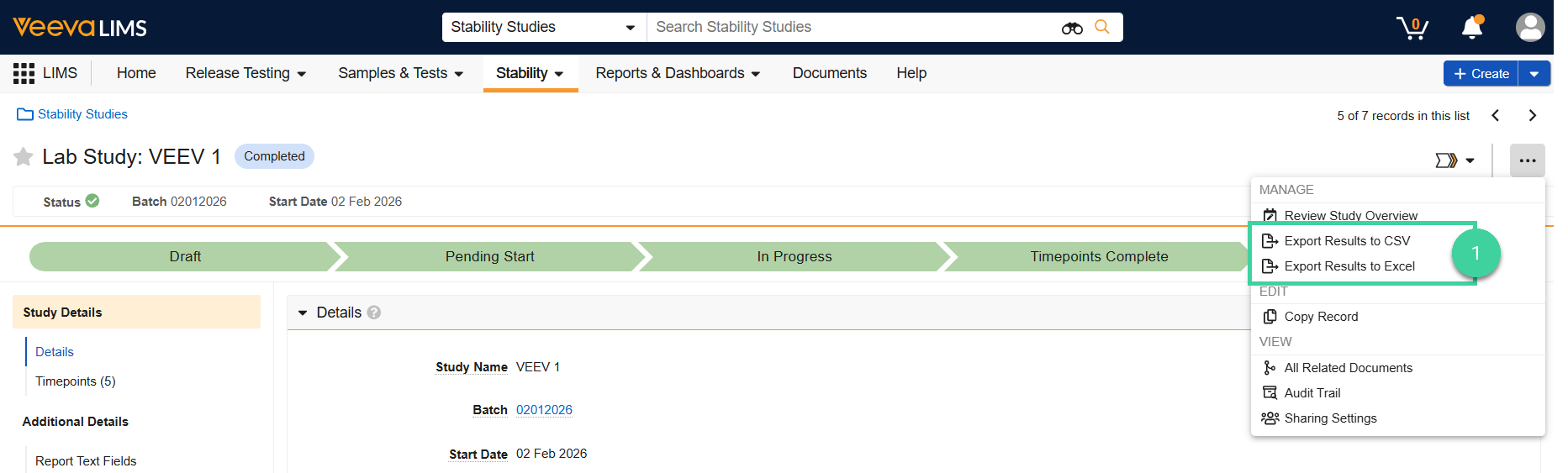
The file will be downloaded to your local drive.
Note
If any timepoints have the Exclude from Stability Report? field set to Yes, the corresponding timepoint results will not be included in the export.