Generate a Stability Report
Last updated: Apr 17, 2026
Who can complete this task?
Veeva LIMS Basics: Stability Design & Study Admin
A Stability Report is automatically generated once all timepoints are complete. However, you also have the option to generate an interim Stability Report. For example, you may choose to generate an interim Stability Report after a condition has been completed.
Note
If the stability study’s owner is inactive, they will need to be replaced with an active user in order for the Stability Report to generate. The Open Stability Studies with Inactive Owners report lists non-completed, non-cancelled stability studies with inactive owners.
Generate Stability Report
To generate a Stability Report:
From a stability study record, select Generate Stability Report from the All Actions menu.
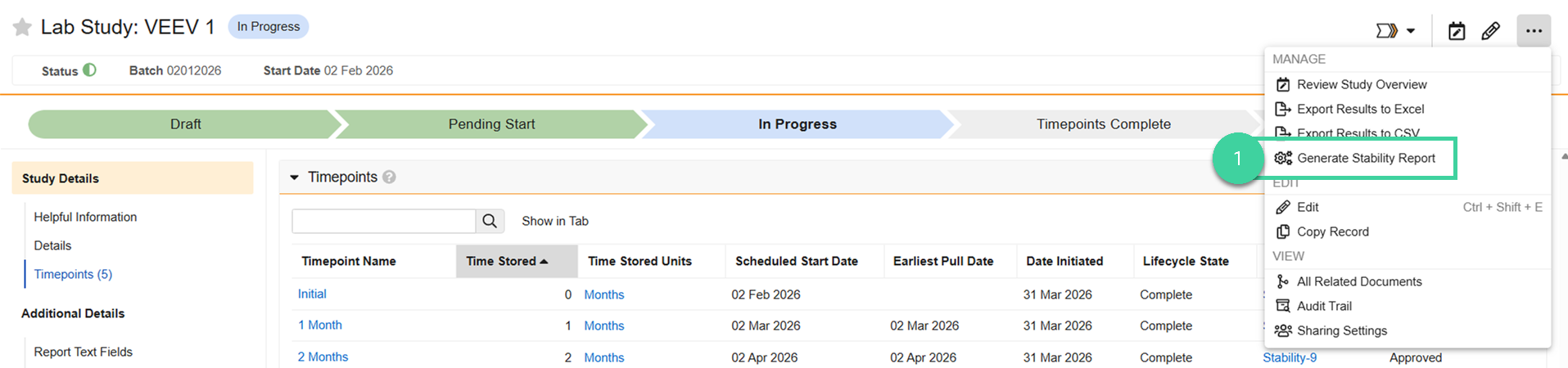
You will receive a notification when it is ready.
Note
If a Stability Report has been generated for a study and then changes are made to that study, for example, results are entered for a timepoint that initiated after the Stability Report was last generated, or if you populated the Report Text Fields, you will need to refresh the Stability Report in order for it to reflect those changes.
Send for Approval
The stability study and the Stability Report will likey be reviewed at the same time, but the report needs to be finalized first, then the study.
To send an interim or final Stability Report for approval:
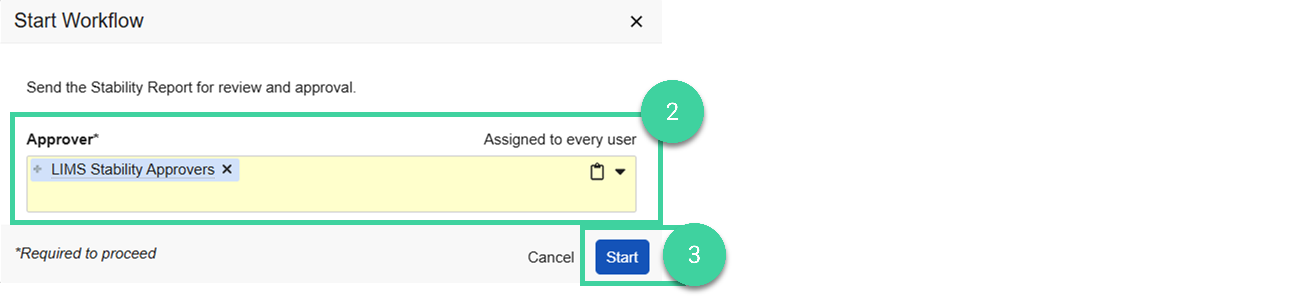
From the Stability Report, select Send for Approval from the All Actions menu.

Specify the Approver (can be an individual or a group).
Note Every specified approver will need to approve the report.Click Start.