

Record Pulled Date
Last updated: Apr 17, 2026
Who can complete this task?
Veeva LIMS Basics: Stability Design & Study Admin, LIMS Results Entry user
If your organization wants to track pulled date and pull compliance for stability samples (i.e., if samples were pulled early, late, or within compliance), there is an optional workflow for that. The workflow can be executed on one or more samples, as long as the Pulled Date is the same for those samples. The workflow is available for stored stability samples (i.e., not timepoint zero) that are in a non final state (i.e., not cancelled, approved, or rejected).
Note
If you want to record the same pull details for multiple samples, you can start a multi-record workflow.
To record the stability pulled date:
Open the sample record you want to update and select Record Pulled Date from the All Actions menu.

Populate the Pulled Date and optionally enter Pull Compliance Comments.
Click Start.
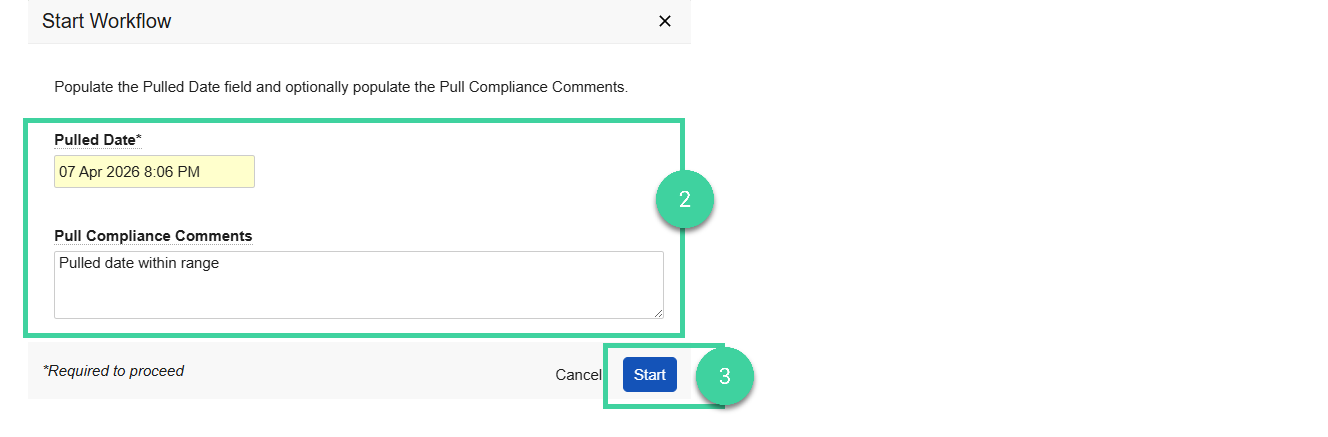
The Pull Compliance will automatically be calculated based on the Pulled Date entered compared to the Earliest Pull Date and the Latest Pull Date. The possible values are:
- Within Range
- Early
- Late