

Complete Medical Migration Activities
Last updated: Apr 28, 2026
These are the steps to performing a migration of Documents into Veeva Medical Basics.
Sandbox Migration
Important
Use the Migration Communication Form to notify Veeva of your upcoming migration at least ten (10) business days prior to providing your files for Sandbox migration.
These are the steps to performing a migration of Documents into Veeva Medical Basics.
Steps
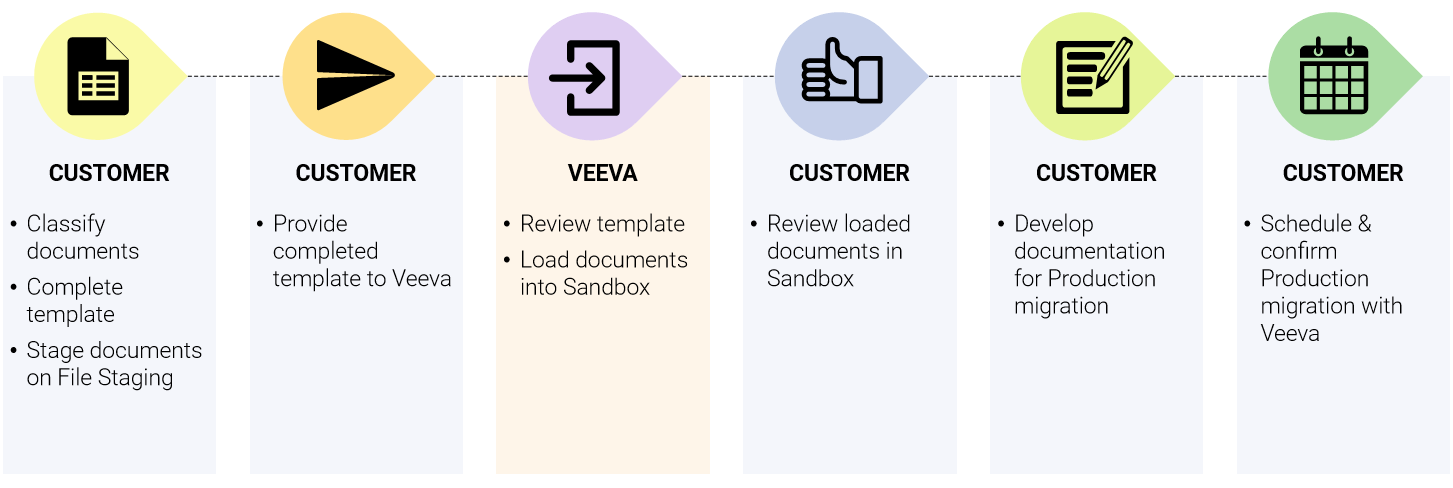
Step 1 (Customer)
Classify documents and populate the Veeva Medical Basics - Document Template.
Important Watch the video and use the information provided on this page to understand how to fill out the Veeva Medical Basics - Document Template correctly.
Always download the latest version of the template. Do not reuse templates from previous migrations.Stage corresponding documents on File Staging.
Step 2 (Customer)
Upload the completed Veeva Medical Basics - Document Template to File Staging. Then use the Migration Communication Form to notify Veeva that your templates have been uploaded.
Step 3 (Veeva)
Veeva will review your completed Veeva Medical Basics - Document Template and load Documents in your Sandbox.
Step 4 (Customer)
Review loaded documents in Sandbox. Verify all records from the template have been migrated, confirm metadata is populated in the correct fields. For documents, confirm files are accessible. If issues are found, first verify the correct value was in the template. If the issue persists, use the Migration Communication Form to let the Veeva Migration Team know.
Step 5 (Customer)
Develop any required migration documentation, such as a Migration Plan.
Step 6 (Customer)
Use the Migration Communication Form to schedule Production migration with Veeva. When scheduling, provide the name of the user who should be assigned as the document owner for all migrated documents. Document ownership can be updated manually after migration is complete.
Note
By scheduling your Production migration, you are confirming that the submitted templates are final with no further changes, as Veeva will use these exact templates to load into Production.
Production Migration
Timeline
Production Migration must be requested and completed within seven (7) business days after Sandbox Migration is completed.
Best Practice
Before the production migration, we recommend notifying your users about the upcoming activity in your Production Vault.
Steps
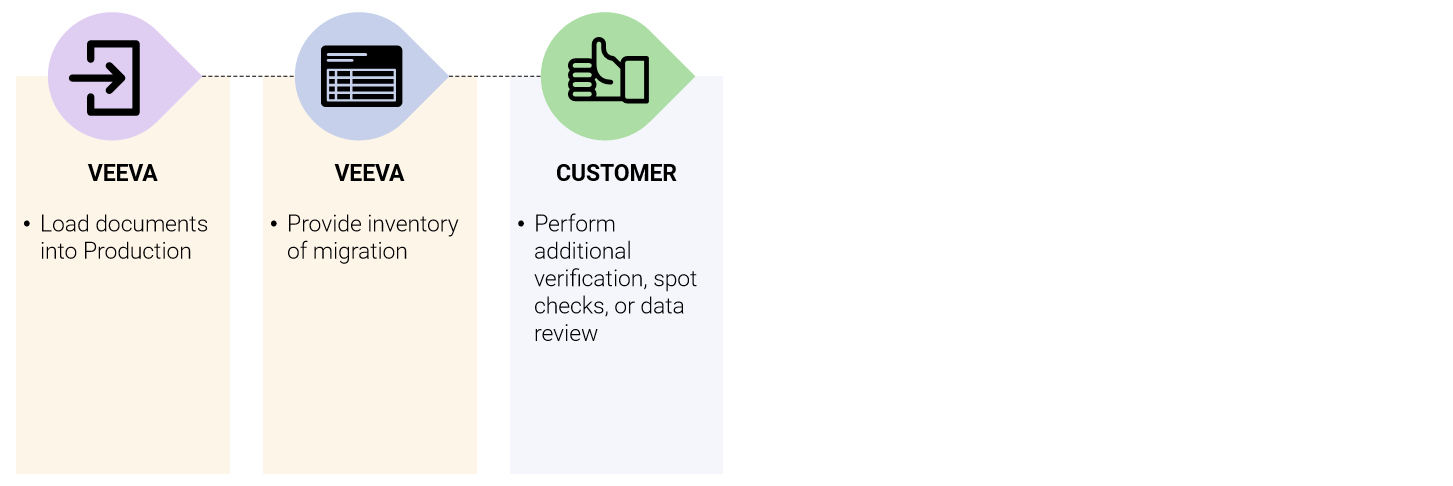
Step 1 (Veeva)
Veeva will load the Documents using templates the Customer confirmed are final when scheduling Production migration.
Step 2 (Veeva)
Veeva will provide:
- A populated Inventory of Migration.xlsx, listing the number of records migrated for each entity
- Loader sheets used for Production migration
- Log files
Note
If any issues are encountered, those will be recorded in the Comments section of the Inventory of Migration.xlsx. The zip of Logs, Loader Sheets, and Inventory will be loaded into the Sandbox Vault for customer access.
Step 3 (Customer)
Important
Customers are responsible for data verification and any additional migration documentation, such as a Migration Summary Report.