Veeva AI
Last updated: Apr 17, 2026
Important
Veeva did not create the LLM that Veeva AI uses, and it is never trained using your data.
Veeva AI, comprised of the Quick Check Agent and the Content Agent, are generative AI tools designed to accelerate the MLR process in Veeva PromoMats Basics by proactively detecting issues in materials, answering questions about materials, and more.
Quick Check Agent
Quick Check Agent helps content owners and coordinators prepare their documents for MLR review by detecting common issues before submission, such as spelling and grammar errors, prohibited phrases, or missing warnings and safety information. It uses a Large Language Model (LLM) to minimize unnecessary rejections during review, and accelerate time to approval.
When viewing a material, Quick Check Agent can be accessed by clicking the Quick Check Agent () button from the right-hand panel.
Quick Check Agent Checks
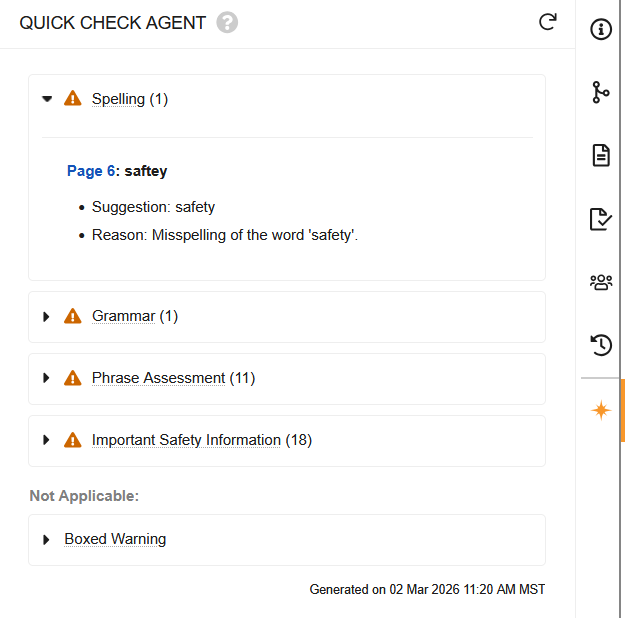
When you open the panel, Quick Check Agent immediately begins performing the following predefined quality checks on the document:
- Spelling
- This check identifies potential spelling errors in the document, focusing on misspellings, common misuses, and typos, while considering industry-specific terminology.
- Grammar
- This check identifies potential grammatical errors in the document, such as verb tense, punctuation, pronoun and subject-verb agreement, and sentence structure.
- Phrase Assessment
- This check identifies wording and phrases that may require review, including those suggesting promotional or potentially misleading language. Quick Check Agent integrates directly with your Claims Library, automatically treating Eligible Claims as Allowed to prevent false positives during this check.
The following two checks apply to United States materials only. For non-US materials, these checks are hidden and do not run.
- Boxed Warning
- This check determines whether the document’s Product requires a Boxed Warning according to the FDA database of Boxed Warning products.
- If Quick Check Agent determines that a Boxed Warning is required, it first detects if one is present, and, if so, evaluates its format and location.
- Quick Check Agent does not review the text of the Boxed Warning.
- Important Safety Information
- This check determines whether a related ISI document exists, and, if so, whether the Important Safety Information in that document is reflected in the current document.
- If there is no related ISI document, Quick Check Agent determines this check to be Not Applicable.
Quick Check Agent Results
When the checks are complete, each check displays an icon to indicate whether the check passed () or identified issues (). Click the check title to expand or collapse the section. Quick Check Agent displays () if it encounters an error, such as when the document exceeds the page limit or the LLM responds with an invalid message.
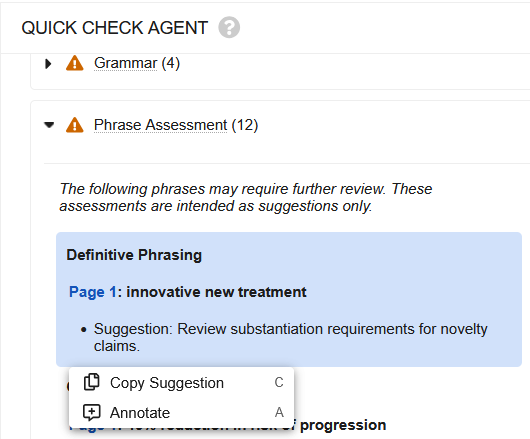
To navigate to an identified issue, click the page number. By default, Vault does not save any detected issues to the document, but you can choose to save specific issues as comment annotations by clicking the specific suggestion, then clicking Annotate ().
Tip
With Quick Check Agent open, you can quickly execute an action using keyboard shortcuts by pressing C for Copy Suggestion or A for Annotate.
Click the Redo () button to clear the results and run Quick Check Agent again, which can be useful if it was run prior to adding a document relationship or a claim.
Content Agent
The Content Agent is Veeva-aware, meaning that it understands Vault structure and document fields and uses this understanding to provide accurate, context-aware responses. It avoids guessing on ambiguous data in charts or images, reporting uncertanties to you instead.
The Content Agent’s AI chat can be accessed by clicking the AI chat () button in the upper right of Vault.
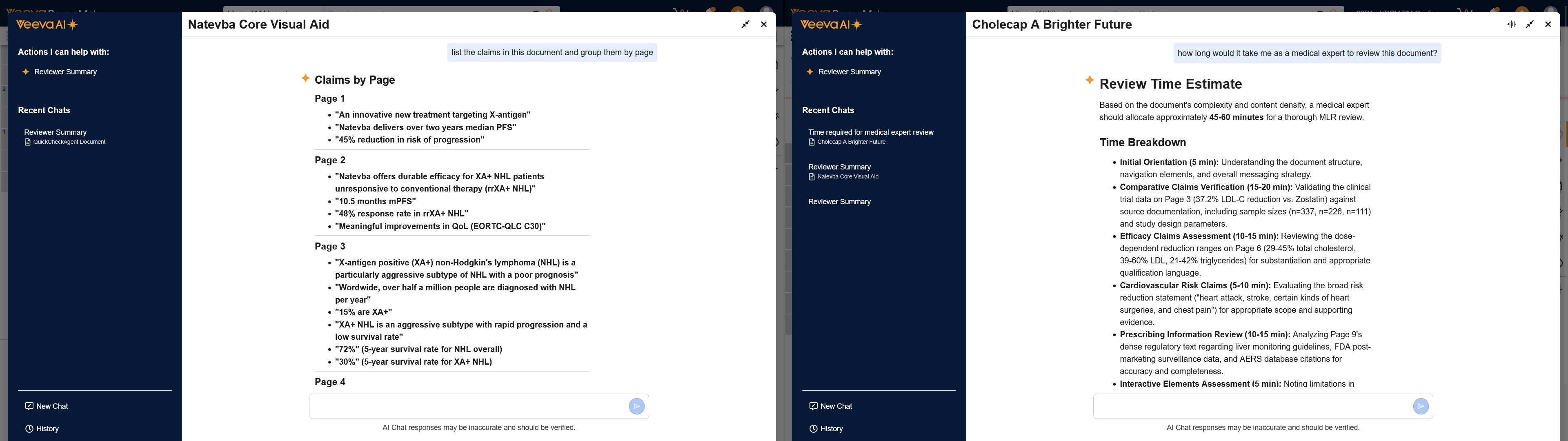
The Content Agent comes with a pre-built prompt for a Reviewer Summary, which provides an overview of the material that includes important callouts if there are issues in the document, such as incorrect classification.
You can also engage the Content Agent directly with questions or statements, such as “how long would it take me to review this document?” or “list the claims in this document and group them by page.”