

Navigating RIM Basics
Last updated: Apr 17, 2026
RIM Basics Tab Collections
The Tab Collections menu allows you to switch between different collections of tabs in Vault. Submission Managers and Document Managers have access to the Submission Management (Mgmt) tab collection only, while Vault Admins have access to the Submission Mgmt, RIM Admin, and Admin tab collections. Your role determines which tabs are available to you in each tab collection you have access to.
Submission Mgmt Tab Collection

- Home: View and complete tasks that have been assigned to you.
- Library: View, upload, author, and manage documents.
- Archive Library: Search archived and published content.
- Submission Mgmt: View Applications, Submissions, and Regulatory Objectives.
- Health Authority Communications: View Health Authority Questions and commitments available for your role.
- Reports and Dashboards: View reports and dashboards available for your role.
- Viewer: View archived submissions (requires an optional Submissions Archive Full User license).
- Help: View help documentation, release notes, Veeva support information, and more.
RIM Admin Tab Collection (Vault Admins Only)
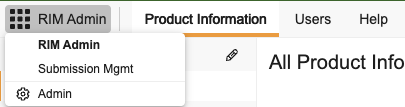
- Product Information: View, create, and manage product families and other core product data.
- Users: View all of your Vault’s users.
- Help: View help documentation, release notes, Veeva support information, and more.
Admin Tab Collection (Vault Admins Only)
- Logs: Provides audit history and logs for Vault Java SDK and API Usage.
- Users & Groups: Allows you to view, create, and manage your Vault’s users and delegations.
- About: Provides Vault Information and Domain information.